
Mobile App Marketing Guide: Strategy, ASO and Retention
Mobile app marketing is everything you do to get the right people to find, install and keep using your app: app store optimization, paid and organic acquisition, onboarding, notifications and measurement. The apps that grow treat marketing as part of the product, building tracking, deep links and retention features in before launch, not after.
This guide is for app founders, product owners and marketing leads. It covers the marketing funnel, strategy, pre-launch work, app store optimization, acquisition channels, retention, measurement after privacy changes, budgets and the features your app needs so marketing actually works.
What is mobile app marketing?
Mobile app marketing is the process of attracting, converting and retaining users for an iOS or Android app. It covers the whole user journey, from discovering the app in a store, ad or search result, through installing and onboarding, to coming back, paying and recommending it. Success is measured by retained, active users, not downloads.
It differs from general digital marketing in three ways:
- The store sits in the middle. Most installs pass through the Apple App Store or Google Play, each with its own rules, search algorithm and listing format.
- The product does much of the marketing. Onboarding, notifications, reviews and sharing all happen inside the app.
- Measurement is harder. Privacy rules limit how installs can be traced back to ads, especially on iPhone.
How does the mobile app marketing funnel work?
The mobile app marketing funnel has five stages: awareness, store visit, install, activation and retention, followed by revenue and referral. Each stage needs different channels, different in-app features and a different metric. Most apps lose the majority of users between install and the first week, so later stages matter as much as early ones.
| Stage | What happens | Main channels or features | Metric to watch |
| Awareness | People learn the app exists | Search, social, communities, ads, PR | Impressions, reach |
| Store visit | They view the store listing | Ads, website, store search, deep links | Product page views |
| Install | They download the app | Screenshots, ratings, custom product pages | Conversion rate (views to installs) |
| Activation | They reach the app’s first real value | Onboarding, permission timing | Activation rate |
| Retention | They come back | Push, email, in-app messages, new features | Day 1, 7 and 30 retention |
| Revenue and referral | They pay and recommend it | Paywall, subscriptions, referral and share features | Revenue per user, referral rate |
When growth stalls, find the stage with the biggest drop and fix that first. Spending more on awareness won’t help if users leave on the first screen.
How do you build a mobile app marketing strategy?
To build a mobile app marketing strategy, define your target user and the problem you solve, study competing apps, set one main goal and the metric that proves it, choose two or three channels that fit your audience and budget, build tracking before launch, then test, measure and shift budget to what works.
A practical strategy answers these questions:
- Who is it for? Describe a specific user, the problem they have and where they already spend time online.
- Why choose you? Write one sentence on what your app does better than the alternatives, including doing nothing.
- What’s the goal? Pick one: activated users, subscribers, bookings or revenue. Downloads alone are rarely the right goal.
- Which channels? Start with a few you can do well rather than every channel at once.
- How will you measure it? Decide on events, attribution and a dashboard before you spend money.
- What’s the budget and timeline? Plan for testing, not just launch day.
Write this on one page. If the team can’t agree on the user and the goal, no channel will fix it.
What should you do before launch?
Before launch, validate demand, prepare your store listings, build analytics and attribution into the app, set up a website or landing page with a sign-up list, recruit beta testers, and plan launch-week content. Pre-launch work decides whether launch-day attention turns into users who stay.
Use this pre-launch checklist:
- Talk to at least a dozen target users and confirm the problem matters to them.
- Build a simple landing page with an email or waitlist sign-up.
- Run a beta through TestFlight on iOS and internal or closed testing on Google Play.
- Write store metadata and design screenshots for both stores.
- Add analytics events for sign-up, activation and key actions.
- Set up deep links so ads, emails and posts open the right screen.
- Decide when and how to ask for ratings and notification permission.
- Make sure your backend can handle a spike in sign-ups.
- Prepare launch posts for the communities where your users already are.
On iOS, apps can also be listed for pre-order, which lets you collect interest and send people to a live store page before release.
What is app store optimization (ASO) and how does it work?
App store optimization (ASO) is the process of improving an app’s store listing so it ranks higher in App Store and Google Play search and converts more visitors into installs. It covers the app name, subtitle or short description, keywords, screenshots, preview video, ratings and reviews. ASO is the most durable low-cost channel for most apps.
ASO has two jobs:
- Ranking: appearing for the words people search, through the text fields each store indexes.
- Converting: persuading people who land on the page to install, through the icon, screenshots, video and ratings.
The first screenshots do most of the work, because many people never scroll. Show the main benefit in plain words on the first two screenshots, not a logo or splash screen.
Apple App Store vs Google Play metadata
The two stores index different fields, so the same text won’t work equally well on both.
| Element | Apple App Store | Google Play |
| App name or title | Up to 30 characters, indexed | Up to 30 characters, indexed |
| Subtitle or short description | Subtitle, up to 30 characters, indexed | Short description, up to 80 characters, indexed |
| Keywords | Hidden keyword field, up to 100 characters | No keyword field |
| Long description | Not used for search ranking | Up to 4,000 characters, indexed |
| Promotional text | Up to 170 characters, editable without an app update | Not available |
| Testing | Product page optimization tests | Store listing experiments |
| Alternate pages | Custom product pages | Custom store listings |
On Google Play, write the long description for people first, with your main keywords used naturally. On iOS, put keywords in the keyword field instead of repeating them in the description.
Custom product pages and custom store listings
Custom product pages are alternate versions of your App Store listing, each with its own screenshots, preview videos, promotional text and link. Apple now allows up to 70 per app, and you can assign keywords so a custom product page appears in App Store search instead of your default page.
Use them to match the page to the person:
- A fitness app sends runners and weightlifters to different pages with different screenshots.
- An ad about a specific feature links to a page that shows that feature first.
- A page for a seasonal campaign highlights the relevant content.
Google Play offers custom store listings for specific countries, audiences or campaigns, and store listing experiments for A/B testing graphics and text. Pair each custom page with a deep link, so people who install land on the screen the page promised.
Ratings, reviews and in-app review prompts
Ratings affect both ranking and conversion. The best way to get more good reviews is to ask at the right moment: right after a user succeeds at something, not on first launch or after an error.
Both stores provide official in-app review prompts that let users rate without leaving the app. On iOS, the system shows the prompt at most three times in a 365-day period, so choose your moments carefully. Google Play’s in-app review API also limits how often the prompt appears. Reply to reviews, especially negative ones, and fix the issues people mention.
Which channels bring app users?
The main channels for app users are app store search, community and social posts, content and SEO on your website, creators and influencers, paid ads on platforms such as Apple Ads, Google, Meta and TikTok, email and referrals from existing users. Most apps grow fastest by mastering two or three channels before adding more.
Organic and community channels
Organic channels cost time rather than money, which makes them the usual starting point.
- Communities. Subreddits, Discord servers, forums and groups where your users already talk. Post about the problem you solve and what you learned, not “check out my app”. Read each community’s rules first.
- Social video. Short videos showing the app solving a real problem often outperform polished ads, especially on TikTok, Instagram and YouTube Shorts.
- Creators. Small, niche creators whose audience matches your user are often a better fit than large accounts.
- Launch platforms. Product Hunt and similar sites can bring early users and feedback, especially for productivity and developer tools.
- PR and reviews. App review sites, newsletters and niche blogs.
- Partnerships. Businesses that serve the same users can promote your app to their audience.
Illustrative example: a budgeting app’s founder answers questions in personal-finance communities for two months, linking to the app only when it directly helps. The first few hundred users arrive with real problems to solve, and their feedback shapes the next release.
Paid user acquisition
Paid user acquisition (UA) means buying installs or actions through ad networks. The main platforms are Apple Ads in App Store search, Google App campaigns across Search, Play, YouTube and the display network, Meta, TikTok and specialized ad networks.
Start paid UA only when three things are true:
- Your store page converts reasonably well from organic traffic.
- Users who install stay long enough to show value.
- Your tracking can tell which campaigns bring users who stay, not just installs.
Test small budgets first, judge campaigns on retained or paying users rather than cost per install, and match each ad to a custom product page and deep link.
Website, SEO and web-to-app
Your website is a marketing channel you fully own. Use it to:
- Rank in Google for the problems your app solves, with helpful articles and landing pages.
- Send visitors to the right store with smart download links that detect the device.
- Collect emails before launch and for people not ready to install.
- Run web-to-app flows, where users sign up or pay on the web and continue in the app.
A web page can be shared, indexed and tested far more easily than a store listing, so many apps put more effort here as store competition grows.
What has to be built into the app for marketing to work?
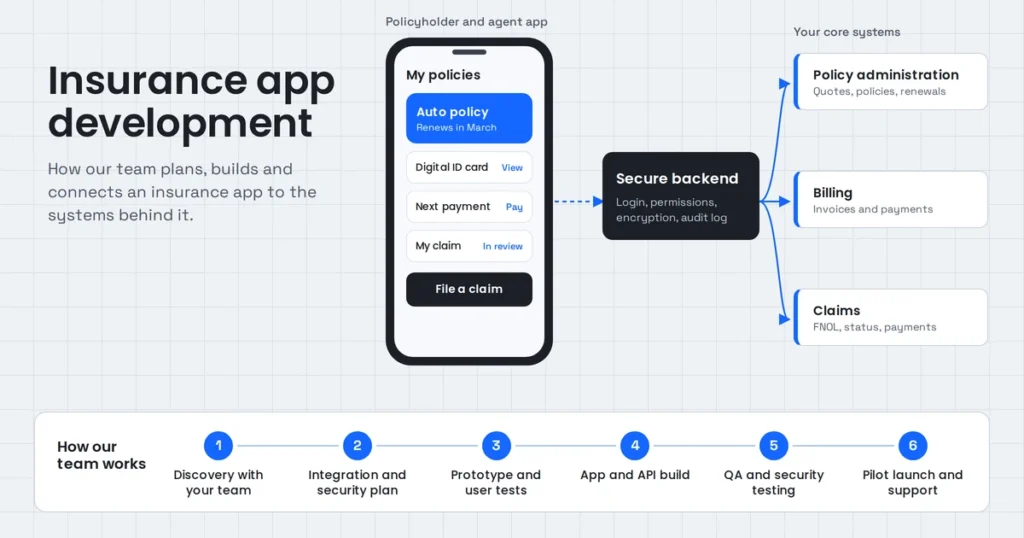
For marketing to work, the app needs analytics events for key actions, an attribution SDK, deep links that open the right screen, well-timed permission requests, an onboarding flow that reaches value fast, in-app review prompts, share and referral features, and a way to send personalized notifications. These are development tasks, and they’re cheapest to add before launch.
This is where most app marketing quietly fails. The ads run, people install, and then nobody can tell what happened or the app loses them on the first screen. Use this checklist with your development team:
- Event tracking plan. A written list of events (sign-up, onboarding complete, first key action, purchase) with consistent names across iOS and Android.
- Analytics and attribution SDKs. An analytics tool plus a mobile measurement partner (MMP) to connect installs to campaigns.
- Deep links. Universal Links on iOS and App Links on Android, plus deferred deep linking so new users land on the promised screen after install.
- Permission timing. Ask for notifications, location or tracking only when the user understands why, with a short explanation screen first.
- Fast onboarding. Let users see value before forcing account creation where possible.
- In-app review prompts triggered after success moments.
- Share and referral features with tracked invite links.
- Messaging infrastructure for push notifications and in-app messages, segmented by behavior.
- Remote configuration to change copy, offers and onboarding without a new release.
- Performance and stability. Crashes and slow screens hurt ratings and retention more than almost anything.
- A backend that scales for launch spikes and campaign bursts.
When we build an app, we plan these with the marketing team during discovery, so the first campaign can be measured from day one. Our mobile app development work covers native and cross-platform builds, and our cloud and DevOps team handles the infrastructure behind launch traffic.
How do you keep users after they install?
You keep users after they install by getting them to the app’s core value in the first session, then giving them good reasons to return: useful notifications, personalized content, new features, saved progress and reminders tied to their goals. Retention is usually cheaper to improve than acquisition and makes every marketing dollar go further.
Onboarding
Onboarding is the first-run experience that takes a new user from opening the app to their first success. Good onboarding:
- Shows one clear benefit, not a feature tour.
- Asks only the questions needed to personalize the first experience.
- Delays account creation until the user has a reason to save something, where your app allows it.
- Ends with the user completing a real action, such as logging a workout, booking a slot or creating a first project.
Measure onboarding step by step and fix the screen where most people drop off.
Push notifications and in-app messages
Push notifications bring users back; in-app messages guide them once they’re inside. Both work when they are timely, personal and useful, and both drive uninstalls when they’re generic.
- Trigger messages from behavior, such as an unfinished task or a goal reached.
- Let users choose topics and frequency.
- Use in-app messages for feature tips and announcements rather than interrupting with popups.
- Use email for longer content and for users who turned off notifications.
AI can help here, for example by personalizing content or answering support questions inside the app. Our AI agent development work includes in-app assistants that answer from approved content and hand off to a person when needed.
How do you measure app marketing after privacy changes?
You measure app marketing by combining an analytics tool for in-app behavior, a mobile measurement partner for campaign attribution, Apple’s privacy-preserving attribution frameworks on iOS, Google Play’s install referrer on Android, and aggregate methods such as incrementality tests. No single source is complete, so compare them and focus on trends.
What changed and what it means:
- iOS. Apps must ask permission through App Tracking Transparency before tracking users across other companies’ apps and websites. Many people decline, so attribution relies more on Apple’s privacy-preserving frameworks, SKAdNetwork and AdAttributionKit, which report aggregated, delayed results.
- Android. Google retired its Privacy Sandbox initiative, including on Android, in October 2025. The Android advertising ID and the Play Install Referrer still work, so Android attribution is more detailed than iOS for now.
- Your own data matters more. Sign-ups, logins, subscriptions and first-party events, collected with consent, are the most reliable signals you have.
Build one dashboard that combines store data, analytics, attribution and revenue. Our data and analytics team builds this kind of reporting so marketing and product look at the same numbers.
Which app marketing metrics matter most?
The app marketing metrics that matter most are store conversion rate, cost per acquisition, activation rate, day 1, 7 and 30 retention, lifetime value and the ratio between lifetime value and acquisition cost. Downloads and impressions are useful context, but they don’t show whether marketing is working.
| Metric | What it tells you | How it’s calculated |
| Store conversion rate | How well your listing persuades visitors | Installs divided by product page views |
| Cost per install (CPI) | What paid installs cost | Ad spend divided by installs |
| Cost per acquisition (CPA) | What a meaningful action costs | Ad spend divided by sign-ups, trials or purchases |
| Activation rate | Whether new users reach first value | Activated users divided by installs |
| Retention (day 1, 7, 30) | Whether users come back | Users active on that day divided by users who installed |
| Daily and monthly active users | Size of your engaged audience | Unique users active per day or month |
| Lifetime value (LTV) | What a user is worth over time | Average revenue per user over their lifetime |
| LTV to CAC ratio | Whether growth is profitable | Lifetime value divided by customer acquisition cost |
Benchmarks vary widely by category, country and business model, so compare against your own past results first.
How much does it cost to market an app?
The cost of marketing an app depends on your category, target countries, channels and whether you use paid ads, creators or an agency. Organic work such as ASO, community posts and content costs mainly time, while paid acquisition costs scale with every install. Set budgets by working back from what a retained user is worth.
A practical way to plan:
- Start with unit economics. Estimate what an average user is worth over time. That’s the most you can afford to pay to acquire one.
- Fund the foundations first. Store assets, analytics, attribution and onboarding improvements make every later dollar work harder.
- Keep a test budget. Spread a small budget across two or three channels for a few weeks, then move money to what brings retained users.
- Budget for creative. Ad fatigue is real; plan fresh screenshots, videos and ad variations regularly.
- Remember running costs. Analytics, attribution, messaging tools and backend hosting grow with your user base.
Costs per install differ a lot between countries and app categories, so check recent benchmarks for your market before setting targets.
Common app marketing mistakes
The most common app marketing mistakes are starting marketing after launch, measuring downloads instead of retained users, spending on ads before the store page and onboarding convert, launching without tracking, asking for permissions too early, and trying every channel at once.
- Launching without tracking. You can’t improve what you can’t measure.
- Buying traffic into a leaky bucket. Fix activation and retention before scaling ads.
- Generic store pages. Screenshots that show menus instead of benefits.
- Permission popups on first launch. Users decline before they see any value.
- Ignoring reviews. Unanswered complaints scare off new users.
- Same message for everyone. Custom product pages and segmented messages convert better.
- Spreading too thin. Two channels done well beat six done badly.
Frequently asked questions
How do I market my app before launch?
Before launch, confirm demand with target users, build a landing page with a sign-up list, run a beta through TestFlight or Google Play testing, prepare store listings and screenshots, add analytics and deep links, and plan launch posts for communities where your users already spend time.
What is ASO in app marketing?
ASO, or app store optimization, is the process of improving an app’s store listing so it ranks higher in App Store and Google Play search and converts more visitors into installs. It covers the app name, subtitle, keywords, description, screenshots, preview video, ratings and reviews.
How can I market my app with no money?
Focus on ASO, community participation, short social videos, outreach to niche creators and bloggers, a simple website with helpful content, and referral features inside the app. These cost time rather than money. Make sure tracking is in place so you know which efforts bring users who stay.
How much does it cost to market an app?
It depends on your category, countries and channels. Organic marketing costs mainly time, while paid acquisition costs grow with every install. Work out what a retained user is worth to you, then set a test budget and spend more only on channels that bring users who stay.
How do I get my first 1,000 app users?
Most apps reach their first 1,000 users through personal networks, niche communities, a pre-launch waitlist, launch platforms, small creators and a strong store listing. Talk about the problem you solve, respond to every early user, and fix whatever stops them from coming back.
How do I track where my app installs come from?
Use an analytics tool for in-app behavior and a mobile measurement partner for attribution. On iOS, combine consented tracking with Apple’s SKAdNetwork and AdAttributionKit. On Android, use the Google Play Install Referrer. Add tracked links and deep links to every campaign.
What features help market an app?
Features that help market an app include fast onboarding, deep links, in-app review prompts, share and referral links, personalized push notifications and in-app messages, and remote configuration for testing. Building these in before launch makes every marketing channel more effective and measurable.
Build an app that’s ready to market
The best marketing plan can’t rescue an app that loses users on the first screen or can’t tell where they came from. If you’re planning a new app or fixing one that isn’t growing, bring us your goals and we’ll build in the onboarding, tracking, deep links and retention features your marketing depends on.
Digitals Cafe designs and builds iOS, Android and cross-platform apps with the analytics and infrastructure growth teams need. See our mobile app development services, or contact us to talk through your app